

Where to find it
Navigate to Analytics → Tracking Links to open the page.What you can do
- Create a unique tracking link for every ad campaign or traffic source
- Compare every accessible creator in one agency-wide summary before opening a creator
- See the full acquisition funnel: clicks → subscriptions → engaged fans → $1+ spenders → high-value fans with $500+ recorded spend
- Compare direct revenue, promo cost, profit, and ROI (profit relative to promo cost) per campaign
- Measure cross-model activity — how fans from a campaign spend on other creators in your agency
- Open a per-campaign detail page with a timeline chart and a per-fan breakdown
- Export everything to CSV
All creators summary
When no creator is selected, the page opens an All creators summary. Each row shows a creator with their link count, Clicks, Subscriptions, Spend, Revenue, and Profit. Click a row to open that creator’s campaign table; use All creators to return. Choose Today, 7 days (default), 30 days, or All time. The period selects links created during that window, then shows the lifetime metrics of those links. Spend is the current value recorded in AgencyKey, not historical spend as of the selected date.Link count is an all-time value, so it is available and sortable only with All time selected. Search, sorting, and pagination run across accessible creators, with 25 rows per page. When more than 100 creators are available, metric-based sorting can fall back to creator order and show a warning.
Page layout
At the top of the page you will see:- Creator selector — choose All creators for the summary or select one creator’s campaigns. The last-used creator is remembered.
- Create Tracking Link — appears next to the creator selector after you choose a creator, if your role can create links.
- Filter — the funnel button lets you show or hide Search, Period, Source, Metrics basis, and Include deleted links. A small colored dot appears on it when a filter is active.
- Refresh — reload the table on demand.
- Export CSV — download the current table.
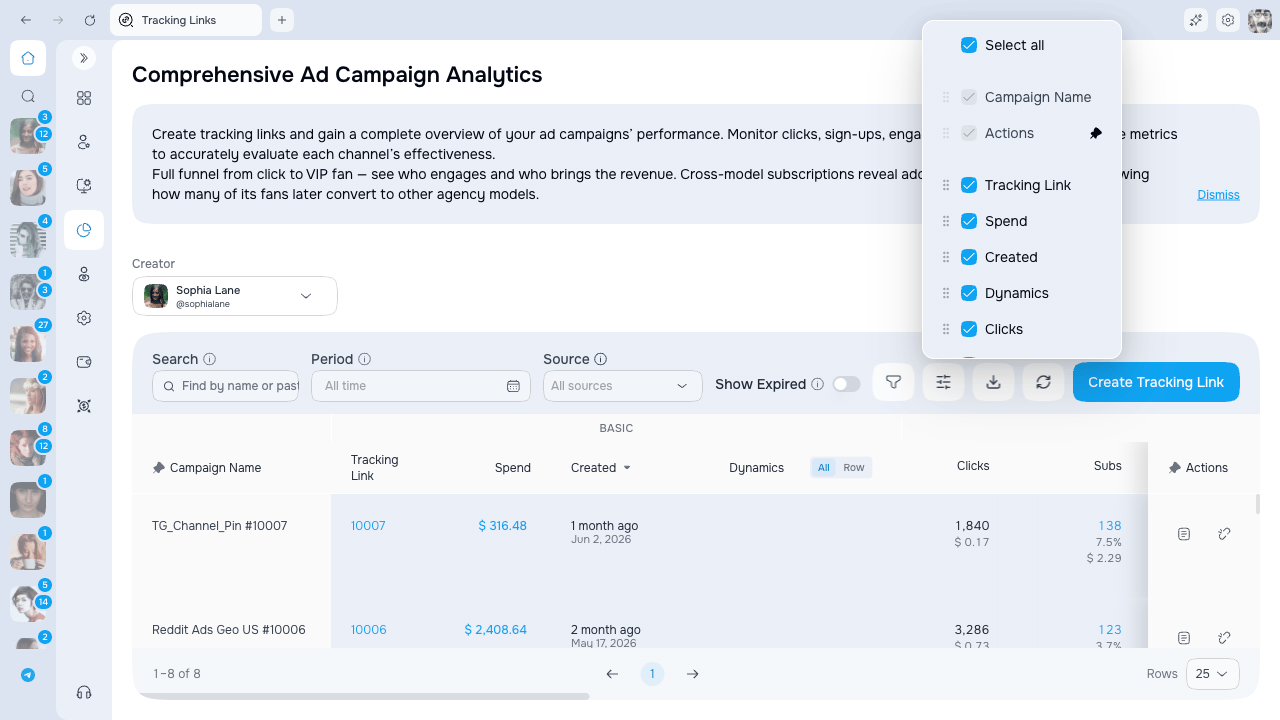
- Columns — toggle which columns are visible. Some columns can be pinned to the left or the right.
Search and filters
The filter bar lives directly above the campaign table. For a user without saved preferences, Search, Period, Metrics basis, and Include deleted links are shown; Source starts hidden. Use the Filter button to show Source or hide controls you do not use. An active Source filter or Unique fans metrics basis remains visible even if an old saved layout hid that control, so the table is never filtered invisibly. Hiding Source clears its value; hiding Metrics basis returns it to All fans.
A Reset button appears at the end of the bar whenever any filter holds a value. One click clears search, period, and the rest.
Two ways to search
The Search box works in two ways, and AgencyKey picks the right one automatically based on what you type:- Type a name — find every campaign whose name contains your text.
- Paste a tracking link — paste a full OnlyFans tracking link and the table jumps straight to that exact campaign. Both the regular link (
https://onlyfans.com/{creator}/c{code}) and the trial link work.
On narrow windows the filter bar stretches to full width, so search and the date range stay easy to use.
Campaign table at a glance
Columns are grouped into five logical blocks — you can read the next page for the full funnel, financial and efficiency story.
The Tracking Link cell displays the link code. Use the copy action in the row to copy the full OnlyFans URL.
A summary row is pinned to the bottom of the table and follows the current filters. Read the filter and pagination labels together with it; do not calculate campaign percentages by adding row percentages.
Tracking attribution identifies the fan cohort that OnlyFans associated with a link. Revenue is the synchronized net earnings recorded for those attributed fans; it does not prove that every later purchase was caused by the ad. Metrics can lag until the next data sync, and changing Source, List, or Spend does not retroactively change which link acquired a fan.
Access and availability
Data visibility follows your creator access scope. You will only see campaigns for creators you are assigned to.
Next steps
- Creating a campaign — how to generate a tracking link and attach a list
- Campaign metrics — how the funnel and financial columns are calculated
- Cross-subscriptions — measuring activity across other creators
- Campaign detail page — timeline chart and per-fan breakdown