

What are Smart Lists
Smart Lists are dynamic OnlyFans audiences you build inside AgencyKey. They can include known fans, accounts the model follows, or both. You set the rules once, and AgencyKey recalculates membership as activity changes. Updates are processed in the background, so check the row’s sync status before relying on the latest membership.- Automatic — accounts are added and removed for you as their data changes
- Behavior-based — segments reflect real spending, chat, and subscription activity
- Automatic upkeep — no manual clean-up; the list updates after its current calculation and synchronization finish
Nothing shows until you pick a model. The model dropdown at the top has a small counter next to each name showing how many Smart Lists and OnlyFans lists that model has.
The Smart List Builder
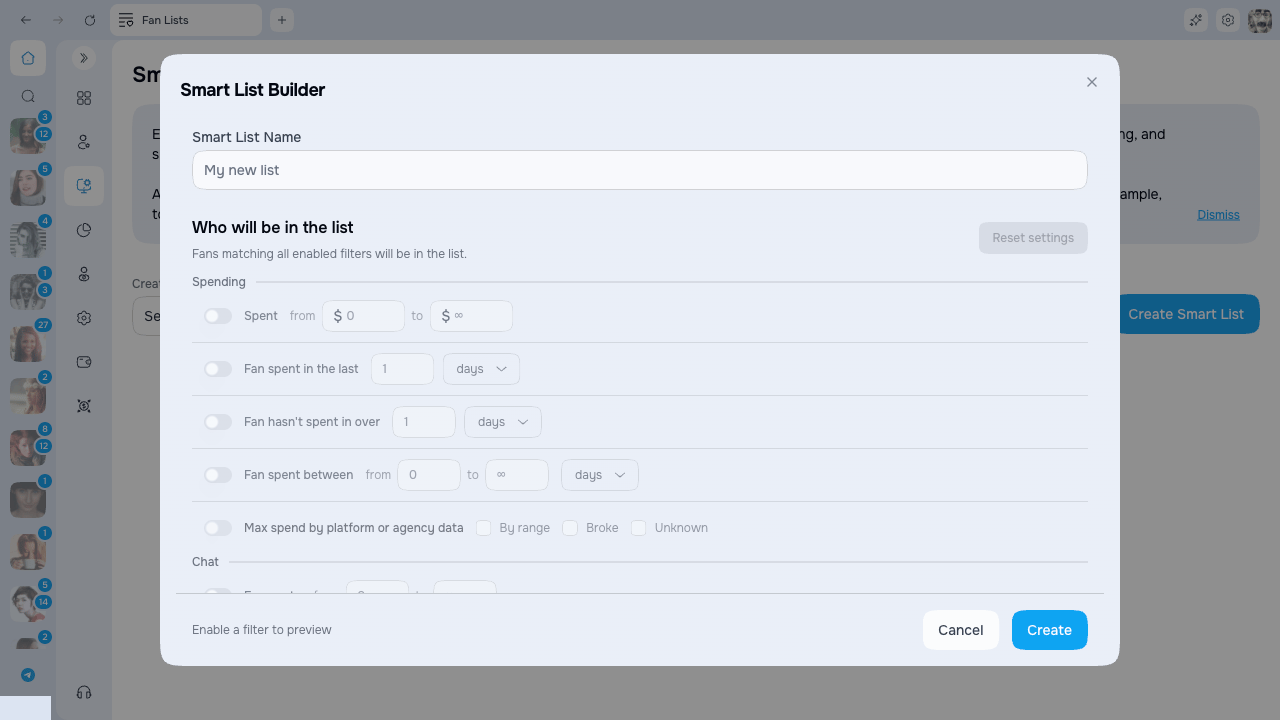
Every list is built and edited from one screen. Click Create (or the pencil icon on a row to edit) and the Smart List Builder opens. There’s no list type to pick first and no separate window per rule — everything lives on a single screen:- Give the list a name at the top.
- Under Who will be in the list, switch on the filters you want.
- Watch the live count at the bottom to see how many accounts the list will hold.
- Click Create (or Save when editing).
- Fans — apply that filter to the model’s known fan audience. This is the default for new and existing lists.
- Following — apply that filter to accounts the model follows.
- Select both checkboxes to apply the same filter to Fans and Following.
Filter groups
Filters are grouped into three sets. Turn on only the ones you need — the rest stay off and are ignored.
The Subscription status filter lets you pick any combination of:
When Expired is selected, you can optionally set a From / To range for how many days ago the subscription ended. Selected statuses are alternatives: choosing Active and Expired includes fans in either state. To target only former subscribers, select Expired and clear the other statuses.
See the count before you save
As you set filters, a line at the bottom of the builder updates on its own:In list X of Y · Won’t be in Z
- X — how many accounts match your filters right now
- Y — the total accounts covered by the selected audience scopes
- Z — how many accounts those filters leave out
The Smart List table
The list table is flat and easy to scan. Each row tells you what the list does and how it’s being used, without opening it.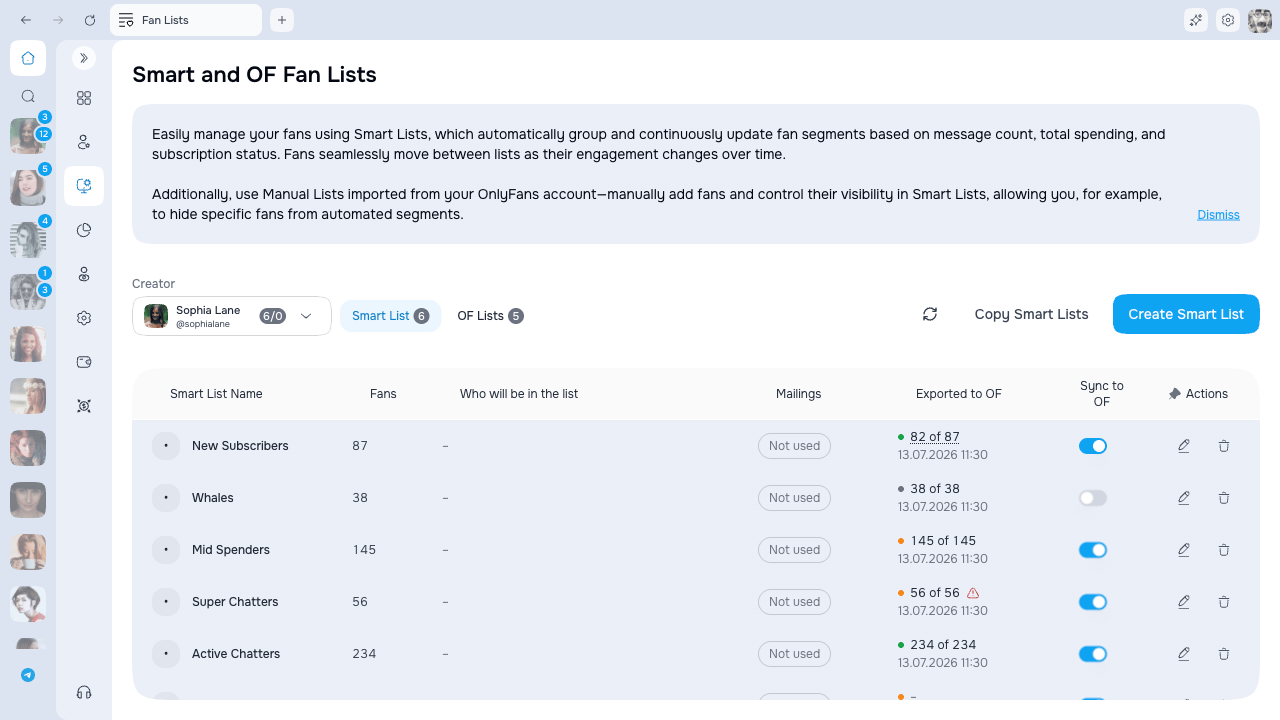
Shared Smart List tabs in chats
Pin an original Smart List from the list menu above the chats to keep it on the chat tab bar. These Smart List pins are shared for that model: teammates with access see the same pinned Smart List tabs, even if they cannot change them. Changing the shared selection requires Chats → Pin and unpin Smart Lists for the model’s allowed scope. The shared set starts empty and does not import older pins from individual computers, so your team may need to pin its working lists again after the update. Only original Smart List pins use this shared setting. An OnlyFans mirror copy is a separate row and keeps its existing independent pin behavior.Sync a list to OnlyFans
Flip Sync to OF on a row and AgencyKey links the Smart List to an OnlyFans list, then keeps its members in step as fans move in and out of your Smart List.- Turn it on for the first time → a matching list is created on OnlyFans and kept in sync.
- Turn it back on → AgencyKey checks the previously linked OnlyFans list and, if it still exists, updates its membership to match the current Smart List. If it was deleted, AgencyKey clears the link; turn sync on once more to create a new mirror.
- Turn it off → the OnlyFans list is frozen. It stays where it is; it just stops updating.
Name conflict with an OnlyFans list
Sync to OF is disabled when a separate OnlyFans list already uses the Smart List’s name. Choose a unique Smart List name or rename/delete the conflicting native list, then enable sync. AgencyKey shows: To enable synchronization, choose a unique Smart List name. A list with this name already exists in OnlyFans. This name check does not detach a mirror that is already linked to the Smart List. It prevents creating an ambiguous new link.When changes reach OnlyFans
AgencyKey combines activity-based updates with regular full-list checks:These intervals tell you when processing starts, not a guaranteed completion time. A queue, a large list, stale source data, or OnlyFans request limits can make an update take longer.
Sync status
The status dot and text in Exported to OF show what is actually happening:When you change a synced list’s filters, AgencyKey re-checks who belongs and updates the OnlyFans list to match.
Copying lists between models
Use Copy to hand one model’s lists to one or more other models — handy for keeping the same segmentation across several accounts.- Click Copy.
- Pick the source model.
- Tick the lists you want to copy.
- Choose one or more target models.
- Confirm.
Editing and deleting
- Edit — click the pencil icon on a row to reopen the Smart List Builder with its current filters. Change the name, toggle filters, and Save.
- Delete — click the trash icon and confirm. Deleting a list cannot be undone.
Deleting a synced list
If the list you’re deleting is synced to OnlyFans, you’ll be asked what should happen to the matching OnlyFans list:Limits
Access
- Anyone who can view Fan Lists can open the table and read every list.
- Creating, editing, deleting, copying, and Sync to OF are available to roles that can manage Fan Lists.
Common issues
“Smart list version not supported.” This list was created in a newer version of the app than the one you’re running. Update the app to edit it.
Related pages
- Fan Lists — overview of Smart Lists and OnlyFans lists
- Mass Message targeting — send to (or exclude) a Smart List