

Requirements
- Trial Links View list and Create link permissions
- The model you want to run the trial for is connected and visible in your access scope
- The model’s account has a paid subscription price set on OnlyFans
1. Open the create dialog
Navigate to Analytics → Trial Links, pick the model in the top-left selector, then click Create Link. Nothing loads until you choose a model, so pick the model first.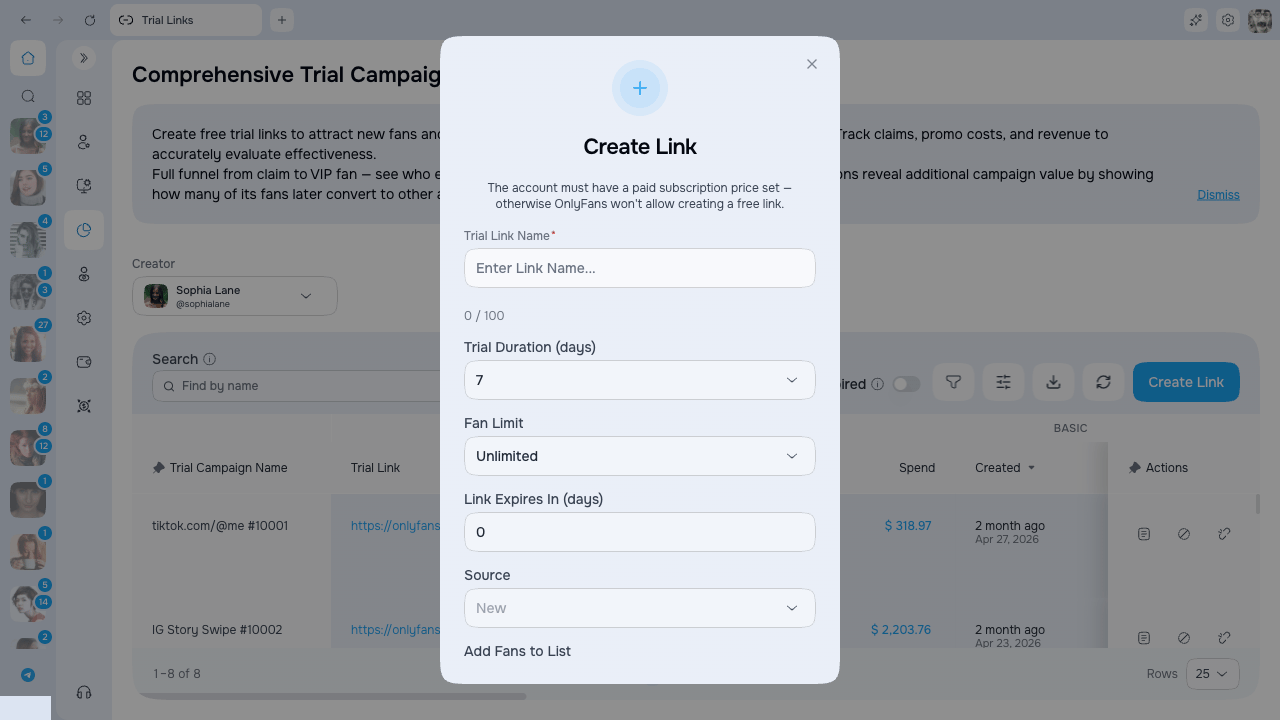
2. Fill in the form
The dialog has six fields. Only the name is required — everything else has a sensible default.Trial Link Name
Use a short, descriptive name such asReddit_bio_July or TikTok_shoutout_2. The character counter under the field shows how much space is left.
Trial Duration (days)
Pick how long the free trial lasts for each fan who claims the link. Only the durations OnlyFans allows are offered — 1, 3, 7, 14, 30, 90, 180, or 360 days.Duration applies per fan, counted from the moment they claim the link — not from when you created it.
Fan Limit
Choose how many fans can claim the link before it stops accepting new ones. Leave it on Unlimited for an open promo, or set a number to cap a giveaway or a limited drop.Link Expires In (days)
Set an expiry so the link stops working after a while — handy for a short campaign. Enter 0 to keep it open forever, or a number up to 30 days.Source
Select an existing traffic source from the dropdown, or leave it empty. The create dialog does not create a new source from typed text. If no options are available, create the link without a source and assign one later after the needed source exists. Setting a source lets you compare which channels bring the best fans.Add Fans to List
If you pick a list, every fan who claims this trial link is added to that OnlyFans list automatically. This is useful for:- Segmenting fans from a specific promo for later mass messages
- Giving a cohort access to a private folder or bundle
- Running tailored scripts for fans from that source
Fans are added in the background right after they claim the link. If you change the list later, only new claimers are added — fans already in are left where they are.