

Trial period
Each newly connected creator receives up to 30 active days of trial use. An active day is a day when the creator is used in CRM messaging or AgencyKey automations run for that creator, including automated messages, mass messages, Smart Lists, or AI features. Days with no qualifying activity do not consume the 30-day allowance. The trial nevertheless ends no later than 90 calendar days after the creator was connected. It therefore ends at whichever comes first:- 30 active days are used; or
- 90 calendar days pass from connection.
Paid subscriptions
After the trial, the subscription renews monthly for each creator. The current tier and price are based on that creator’s net earnings over the previous 30 days and are shown in the interface before renewal. Charges come from the shared agency balance. One creator’s subscription status does not change the status of other creators.Overview
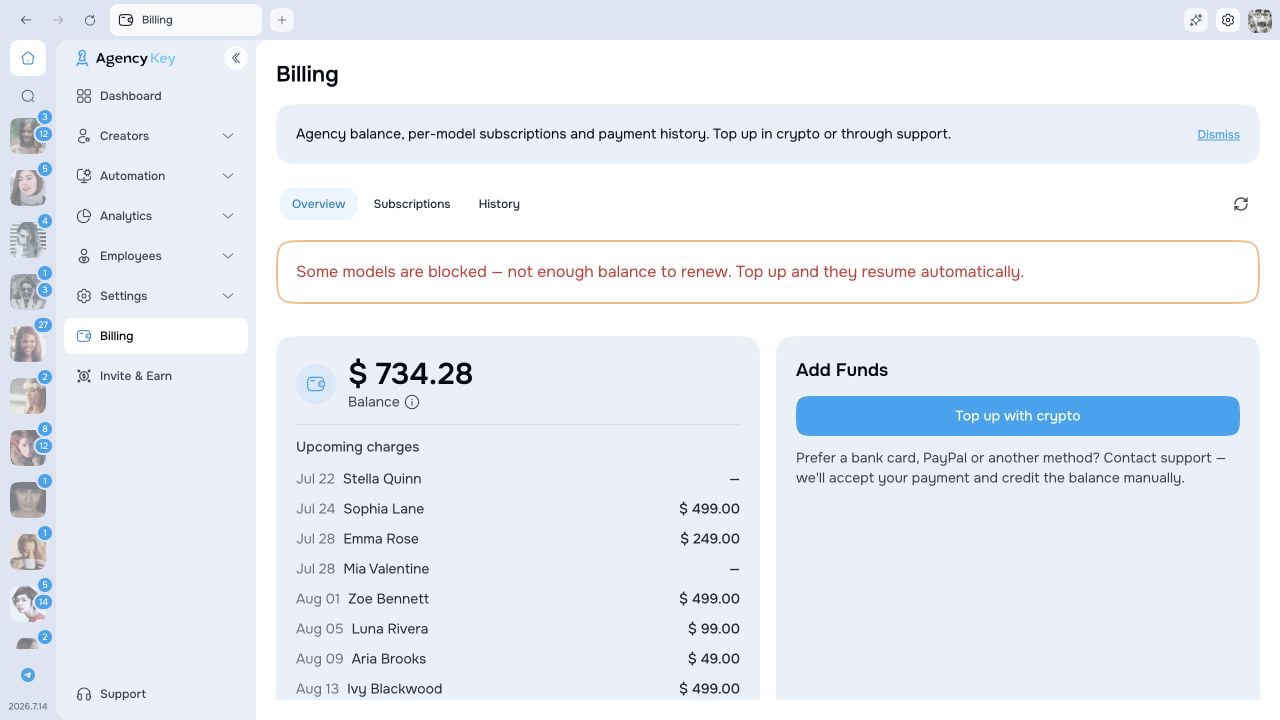
The Overview tab shows:- available agency balance;
- upcoming charges and total expected monthly amount;
- creator subscription summaries;
- recent balance transactions;
- the option to add funds.
Payment forecast
The balance card shows the next expected charge date and amount and can warn how much to add for the next 7 days. The required top-up covers currently unpaid subscriptions and known charges due during that window, minus the available balance. Known or estimated trial-end charges inside this window are included; charges beyond it are not. An ≈ amount is an estimate. A trial date assumes continued daily use, so inactive days can move it later, up to the trial’s 90-day calendar limit. The subscription price is recalculated from the creator’s earnings when the charge is due. If a date or amount is still unknown, Billing identifies the missing estimate instead of counting it as zero. Open Model plans for each creator’s next charge, trial progress, grace-period end, and current or expected price. The forecast is read-only: it does not reserve balance or create a charge.Top up the balance
The Add Funds card separates automatic cryptocurrency deposits from payment methods handled through AgencyKey support.Cryptocurrency — automatic
In the Add Funds card, click Top up with crypto. Before the deposit address, review Due now, Renewals in the next 7 days, and the As of snapshot time. Don’t renew is available for an eligible upcoming renewal only with subscription-management access. An old-data warning needs Retry before relying on the list. The preview does not reserve money or guarantee that one transfer will cover every charge. Some plans can remain unpaid if the balance is insufficient. Check the current amounts before paying. Select a supported asset and network, then use the displayed address or QR code.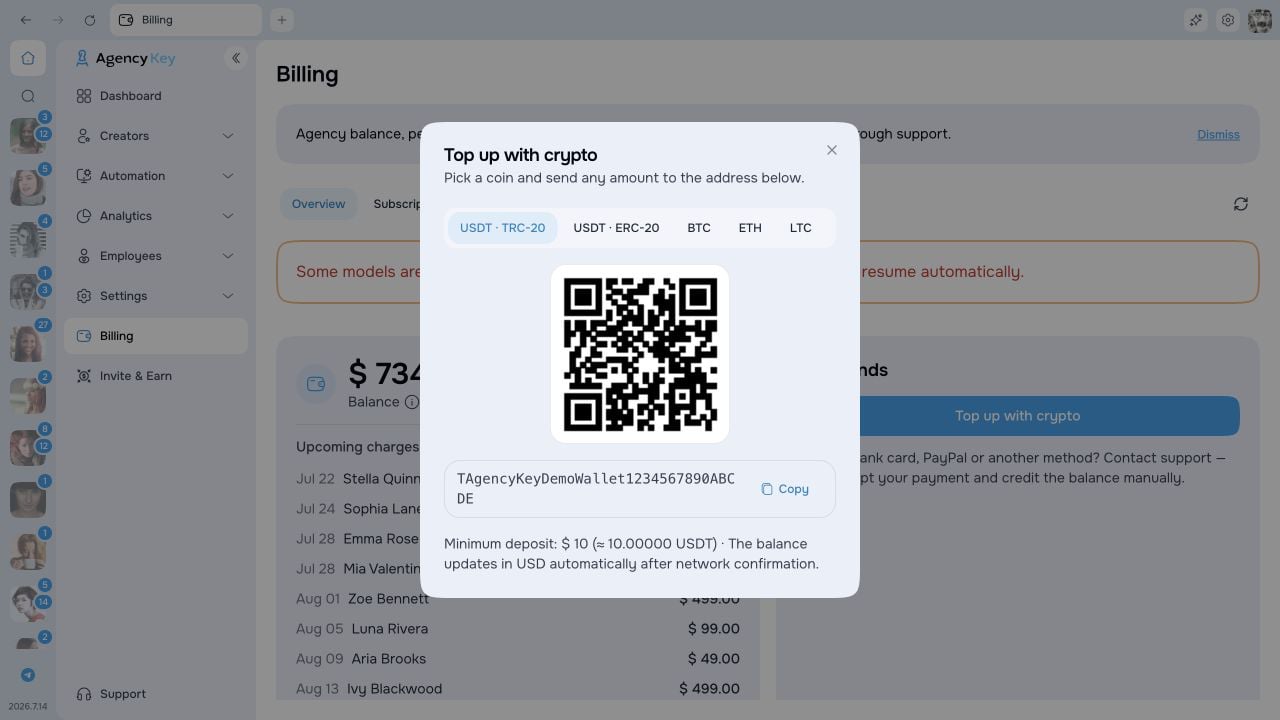
Card and other methods — via support
Under Other methods, choose one of the available options:- Credit or debit card
- PayPal
- Apple Pay
- Google Pay
- Bank transfer
- Other method
Confirm that the deposit was credited
After sending, use Check credit to refresh the balance and open Billing → History → Top-ups. If AgencyKey has confirmed the transfer but is still updating the balance, wait and check History before sending another payment.
The top-up is complete only when History shows Completed and the available agency balance has increased. If your wallet shows the required confirmations but Billing remains Pending, Failed, or has no matching entry after refresh, contact AgencyKey Support. Include the agency email, asset and network, amount, transfer time with time zone, and transaction hash.
Renewal failure and grace period
If the balance cannot cover a renewal, that creator enters a 7-day grace period. The creator remains available during grace. Top up before the period ends; AgencyKey retries and restores the normal subscription state after payment. If payment is still unavailable after grace:- outgoing messages for that creator are paused, including automation sends;
- other creators continue according to their own subscription status;
- existing CRM data, settings, administration, and analytics remain available.
Subscription statuses
Cancel or resume renewal
In Model plans, open the creator’s row and choose Cancel, then confirm Cancel renewal. The current trial or paid period is not shortened; after it ends, outgoing messages pause without another renewal charge. Use Resume renewal to turn renewal back on. During an active period, this does not charge immediately. After the period has ended, AgencyKey first calculates the current price and asks you to Pay … and resume for the next 30 days. Review the amount before confirming. If the balance is insufficient, use Top up balance, confirm the credit in History, then repeat Resume renewal. A confirmed transfer still being credited can offer Check credit. A failed price calculation does not authorize a charge, and a changed quote requires reviewing the new amount rather than accepting an unshown price.Refunds and balance returns
For eligible charges, request deadlines, processing times, and the return of unused paid balance, see Refunds and balance returns.Transaction history
The History tab lists top-ups, subscription charges, refunds, and promotional-credit reversals. A reversal appears as Bonus reversal, with the description Promotional credit reversal and the status Reversed. It also shows the payment source, such as crypto, manual credit, or agency balance, and the transaction status. Use the type filters to narrow the list and the status guidance above to confirm a crypto top-up.Permissions
Billing access is granular. A role can separately be allowed to:- view billing information;
- add funds;
- manage creator subscriptions.