> ## Documentation Index
> Fetch the complete documentation index at: https://agencykey.com/docs/llms.txt
> Use this file to discover all available pages before exploring further.
# Captions, hashtags and metadata
> Attach descriptions, hashtags, prices, and tagged creators to vault media
AgencyKey attaches its own layer of metadata to every vault item, separate from OnlyFans. This is where captions, hashtags, suggested prices, and tagged creators live — all editable from the CRM and re-usable across chats, PPV, and mass messages.
## Opening media details
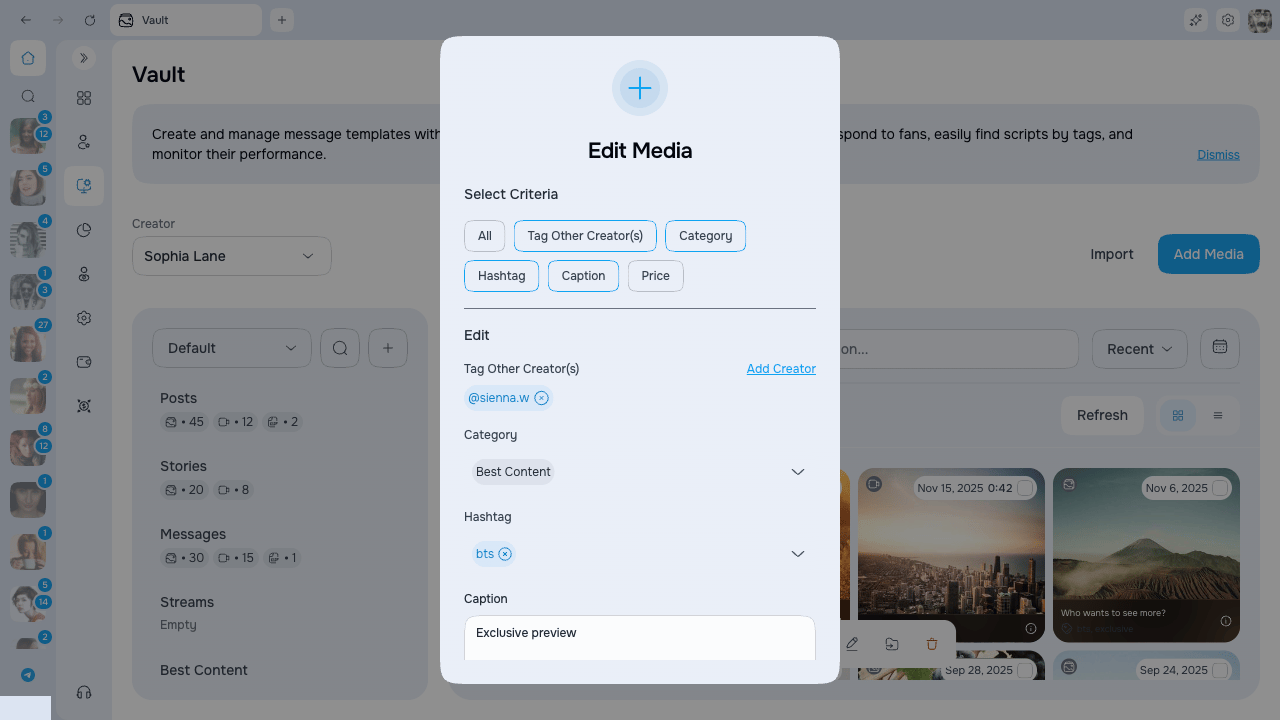
Click any thumbnail in the Vault grid to open the **Media Details** modal. The modal shows a preview on one side and the editable metadata on the other.
 ### Fields
| Field | Description |
| ---------------------- | -------------------------------------------------------------------------------------------------------------------------- |
| **Description** | Free-form caption for the media. Shown as an overlay on the grid and in the gallery picker. UI limit is **256 characters** |
| **Hashtags** | Up to **50 tags per item**, each up to **100 characters**. Used for search and for the hashtag overlay |
| **Category** | One or more OnlyFans lists the media belongs to |
| **Tag Other Creators** | Release forms — creators featured in the media |
| **Suggested Price** | Price shown next to the item for quick reference (set during upload) |
| **Likes** | Number of likes reported by OnlyFans — read-only |
| **Uploaded By** | Which AgencyKey user added the file — read-only |
| **Uploaded** | Upload date — read-only |
Press Cmd+Enter (or Ctrl+Enter) to save. If you try to close the modal with unsaved changes, you are asked to confirm.
## Captions (descriptions)
The description is visible in three places:
* **Vault grid tile** — bottom overlay on every thumbnail
* **Gallery picker** — when attaching media to scripts, PPV, or mass messages
* **OnlyFans chat** — injected overlay on vault photos opened in the chat
Captions truncate with an ellipsis. Hover the info icon on the overlay to see the full text.
## Hashtags
Hashtags help you group related media (e.g. `summer`, `lingerie`, `pov`) and search across the library.
### Adding tags to an item
In the Media Details modal, click **Hashtags** to open the tag popover. It shows every hashtag that exists for this creator.
* Click a tag to attach or detach it from the current item
* Type in the input and press the **+** button to create a new tag — it is attached to the current item immediately
* The interface updates immediately; if saving fails, it restores the previous tag and shows the failure
### Renaming a hashtag globally
Click the **pencil icon** next to any hashtag to rename it. The rename applies **everywhere** — every item that uses this hashtag is updated in one operation.
Global rename cannot be undone. Double-check the new name before confirming.
### Deleting a hashtag globally
Click the **trash icon** next to a hashtag to remove it from every item in the vault. A confirmation dialog appears first.
Global delete also cannot be undone. The hashtag is detached from all media.
## Tagged creators (release forms)
Use **Tag Other Creators** to record every creator that appears in the media. This keeps release forms organized and makes it easier to filter collaborations later.
## Suggested price
The suggested price is set during the upload wizard and is a reference value — it is not sent to OnlyFans automatically. When you attach the media to a PPV message, you can copy this price or override it.
## Uploader information
The **Uploaded By** and **Uploaded** fields tell you who added the file to the vault and when. This is visible in the Media Details modal and in the list view of the main page.
## Next steps
* [Bulk actions](./bulk-actions) — Edit metadata for many items at once
* [Gallery picker](./gallery-picker) — How metadata appears when selecting media
### Fields
| Field | Description |
| ---------------------- | -------------------------------------------------------------------------------------------------------------------------- |
| **Description** | Free-form caption for the media. Shown as an overlay on the grid and in the gallery picker. UI limit is **256 characters** |
| **Hashtags** | Up to **50 tags per item**, each up to **100 characters**. Used for search and for the hashtag overlay |
| **Category** | One or more OnlyFans lists the media belongs to |
| **Tag Other Creators** | Release forms — creators featured in the media |
| **Suggested Price** | Price shown next to the item for quick reference (set during upload) |
| **Likes** | Number of likes reported by OnlyFans — read-only |
| **Uploaded By** | Which AgencyKey user added the file — read-only |
| **Uploaded** | Upload date — read-only |
Press Cmd+Enter (or Ctrl+Enter) to save. If you try to close the modal with unsaved changes, you are asked to confirm.
## Captions (descriptions)
The description is visible in three places:
* **Vault grid tile** — bottom overlay on every thumbnail
* **Gallery picker** — when attaching media to scripts, PPV, or mass messages
* **OnlyFans chat** — injected overlay on vault photos opened in the chat
Captions truncate with an ellipsis. Hover the info icon on the overlay to see the full text.
## Hashtags
Hashtags help you group related media (e.g. `summer`, `lingerie`, `pov`) and search across the library.
### Adding tags to an item
In the Media Details modal, click **Hashtags** to open the tag popover. It shows every hashtag that exists for this creator.
* Click a tag to attach or detach it from the current item
* Type in the input and press the **+** button to create a new tag — it is attached to the current item immediately
* The interface updates immediately; if saving fails, it restores the previous tag and shows the failure
### Renaming a hashtag globally
Click the **pencil icon** next to any hashtag to rename it. The rename applies **everywhere** — every item that uses this hashtag is updated in one operation.
Global rename cannot be undone. Double-check the new name before confirming.
### Deleting a hashtag globally
Click the **trash icon** next to a hashtag to remove it from every item in the vault. A confirmation dialog appears first.
Global delete also cannot be undone. The hashtag is detached from all media.
## Tagged creators (release forms)
Use **Tag Other Creators** to record every creator that appears in the media. This keeps release forms organized and makes it easier to filter collaborations later.
## Suggested price
The suggested price is set during the upload wizard and is a reference value — it is not sent to OnlyFans automatically. When you attach the media to a PPV message, you can copy this price or override it.
## Uploader information
The **Uploaded By** and **Uploaded** fields tell you who added the file to the vault and when. This is visible in the Media Details modal and in the list view of the main page.
## Next steps
* [Bulk actions](./bulk-actions) — Edit metadata for many items at once
* [Gallery picker](./gallery-picker) — How metadata appears when selecting media