> ## Documentation Index
> Fetch the complete documentation index at: https://agencykey.com/docs/llms.txt
> Use this file to discover all available pages before exploring further.
# Team Members
> Manage your agency employees, their roles, and access to creators
Use Team Members to organize your agency staff and control who can work with each creator. Invite employees, place them in groups, and manage their roles and creator assignments from one page.
## Where to find it
Open **Employees → Team Members** in the sidebar.
## What you can do
* Invite new employees
* Create groups and subgroups
* Assign roles and creators
* Activate or deactivate employees
* Remove employees and revoke their access
## Page layout
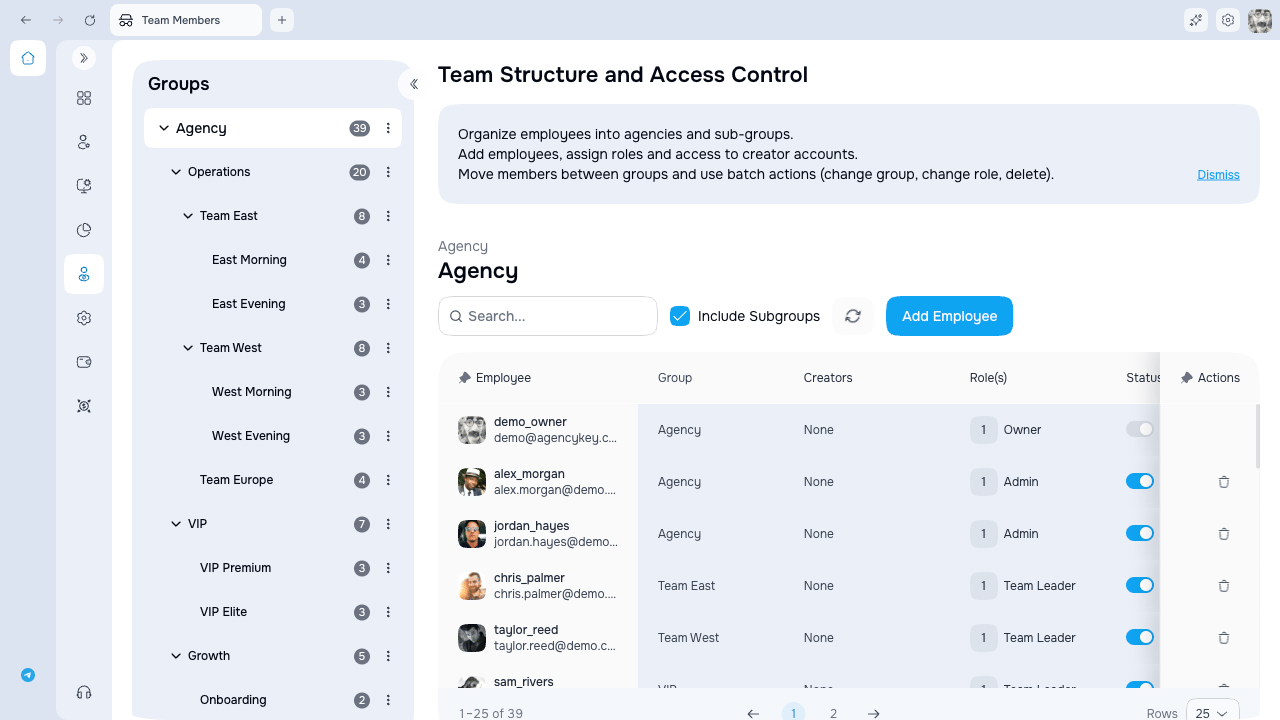 | Area | Description |
| --------------------------- | ------------------------------------------ |
| **Groups panel** (left) | Hierarchical group tree with member counts |
| **Employees table** (right) | List of employees in the selected group |
## Table columns
| Column | Description |
| -------- | ------------------------------------------------------------ |
| Employee | Avatar and email (used for login) |
| Group | Employee's department |
| Creators | Avatars of assigned creators. Click to quickly edit the list |
| Roles | Assigned roles (define permissions) |
| Status | Active / Inactive / Inviting |
**Inactive** is a reversible access pause: the employee cannot sign in, while roles, creator assignments, and settings remain for later reactivation. **Remove** is different: it revokes sessions, removes role and creator assignments, releases the email for a new invitation, and removes the row. Historical or audit records may still remain.
## Access and availability
Opening the page requires Team Members view access. Your data scope determines whether you can see everyone in the agency, your group and its subgroups, or only yourself. Invitations, status changes, group management, assignments, and removal depend on separate permissions.
## Next steps
* [Managing employees](./employees) — invite employees, manage status, and edit settings
* [Groups](./groups) — organize employees into a hierarchy
* [Assignments](./assignments) — assign creators, roles, and groups to employees
| Area | Description |
| --------------------------- | ------------------------------------------ |
| **Groups panel** (left) | Hierarchical group tree with member counts |
| **Employees table** (right) | List of employees in the selected group |
## Table columns
| Column | Description |
| -------- | ------------------------------------------------------------ |
| Employee | Avatar and email (used for login) |
| Group | Employee's department |
| Creators | Avatars of assigned creators. Click to quickly edit the list |
| Roles | Assigned roles (define permissions) |
| Status | Active / Inactive / Inviting |
**Inactive** is a reversible access pause: the employee cannot sign in, while roles, creator assignments, and settings remain for later reactivation. **Remove** is different: it revokes sessions, removes role and creator assignments, releases the email for a new invitation, and removes the row. Historical or audit records may still remain.
## Access and availability
Opening the page requires Team Members view access. Your data scope determines whether you can see everyone in the agency, your group and its subgroups, or only yourself. Invitations, status changes, group management, assignments, and removal depend on separate permissions.
## Next steps
* [Managing employees](./employees) — invite employees, manage status, and edit settings
* [Groups](./groups) — organize employees into a hierarchy
* [Assignments](./assignments) — assign creators, roles, and groups to employees