> ## Documentation Index
> Fetch the complete documentation index at: https://agencykey.com/docs/llms.txt
> Use this file to discover all available pages before exploring further.
# Smart Lists
> Build any fan segment from one screen — filters for spend, chat, and subscription — and sync a list straight to OnlyFans
## What are Smart Lists
Smart Lists are dynamic fan segments you build inside AgencyKey. You set the rules once, and AgencyKey recalculates membership as activity changes. Updates are processed in the background, so check the row's sync status before relying on the latest membership.
* **Automatic** — fans are added and removed for you as their data changes
* **Behavior-based** — segments reflect real spending, chat, and subscription activity
* **Automatic upkeep** — no manual clean-up; the list updates after its current calculation and synchronization finish
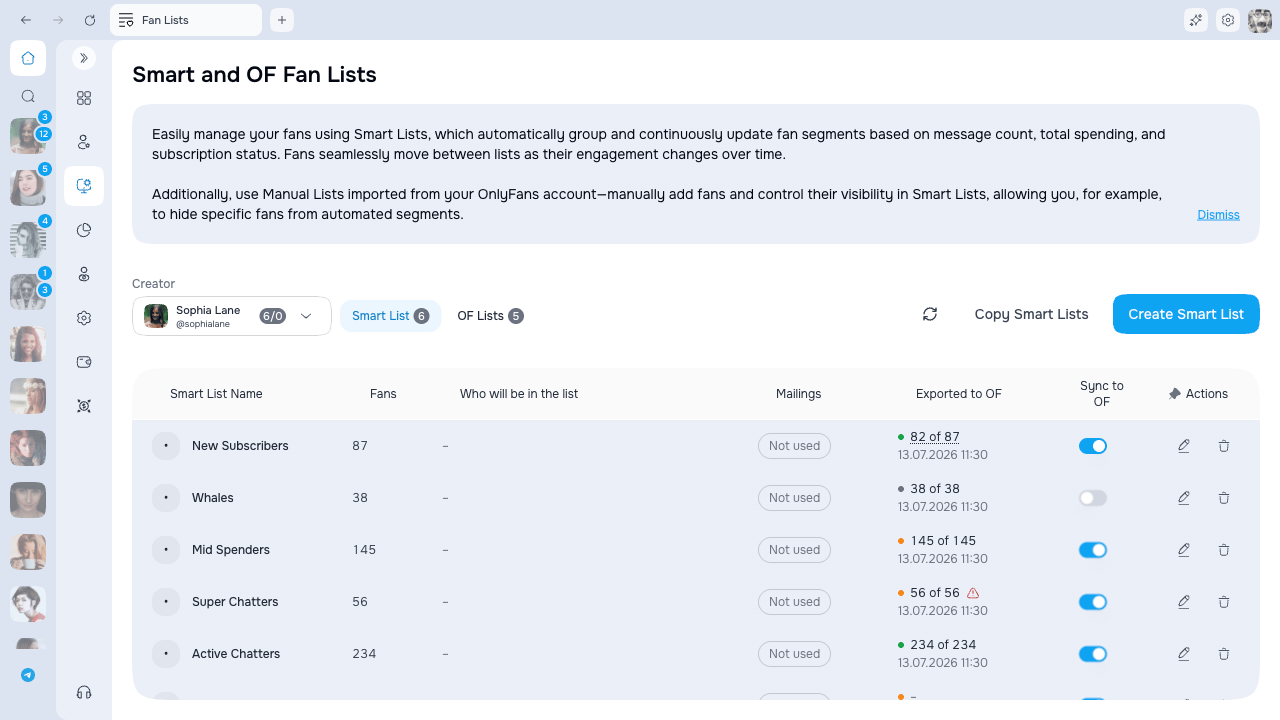
You'll find Smart Lists under **Automation > Fan Lists**. Pick a model at the top of the page, then stay on the **Smart List** tab.
Nothing shows until you pick a model. The model dropdown at the top has a small counter next to each name showing how many Smart Lists and OnlyFans lists that model has.
## The Smart List Builder
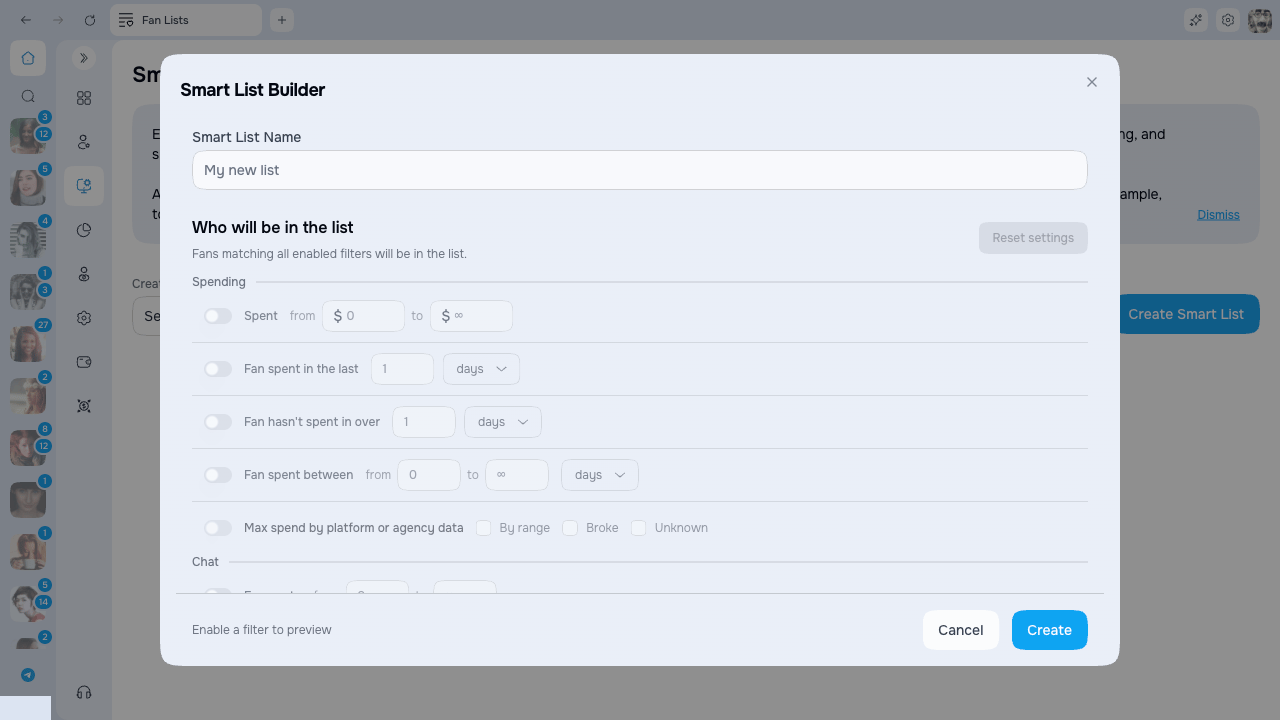
Every list is built and edited from one screen. Click **Create** (or the pencil icon on a row to edit) and the **Smart List Builder** opens.
There's no list type to pick first and no separate window per rule — everything lives on a single screen:
1. Give the list a **name** at the top.
2. Under **Who will be in the list**, switch on the filters you want.
3. Watch the live count at the bottom to see how many fans the list will hold.
4. Click **Create** (or **Save** when editing).
A fan joins the list when they match **all** the filters you turned on. If you enable three filters, a fan must satisfy all three. Use **Reset filters** to switch everything off and start clean.
 ### Filter groups
Filters are grouped into three sets. Turn on only the ones you need — the rest stay off and are ignored.
| Group | What you can filter on |
| ---------------- | ---------------------------------------------------------------------------------------------------------------------------------------------------------------- |
| **Spend** | How much a fan spent in total, or how much they spent in the last few days |
| **Chat** | Who wrote and how many messages, how recently each side wrote, how long a fan has been silent, how many PPVs were sent, and whether the chat was active recently |
| **Subscription** | Subscription expiring within a set number of days, how many days a fan has been subscribed, and subscription status |
The **Subscription status** filter lets you pick any combination of:
| Status | Meaning |
| ----------------- | ------------------------------------------------------------------------- |
| **Active** | The fan has a live subscription |
| **No auto-renew** | Subscribed, but auto-renew is switched off — this subscription will lapse |
| **Expired** | The subscription has run out |
### See the count before you save
As you set filters, a line at the bottom of the builder updates on its own:
> **In list X of Y · Won't be in Z**
* **X** — how many fans match your filters right now
* **Y** — the model's total fan count
* **Z** — how many fans your filters leave out
This way you know exactly how big the list will be before you save it. The count refreshes a moment after each change.
If you enter a range the wrong way round — a "to" value smaller than the "from" value — you'll see the note **"To" cannot be less than "From".** right on the filter. Swap the two numbers to fix it and the count updates again.
## The Smart List table
The list table is flat and easy to scan. Each row tells you what the list does and how it's being used, without opening it.
| Column | What it tells you |
| --------------------------- | --------------------------------------------------------------------------------------------------------------------------------------- |
| **Name** | The list name, with a small badge for its main rule |
| **Fans** | How many fans are in the list right now |
| **Who will be in the list** | A plain summary of the rules. When there are more rules than fit, the extras tuck into a **+N filters** chip — hover it to see the rest |
| **Mailings** | How many mass messages use this list as their audience, or **Not used** |
| **Exported to OF** | How many planned fans were confirmed in the OnlyFans list and when the last full check finished |
| **Sync to OF** | The on/off switch for OnlyFans sync (see below) |
### Filter groups
Filters are grouped into three sets. Turn on only the ones you need — the rest stay off and are ignored.
| Group | What you can filter on |
| ---------------- | ---------------------------------------------------------------------------------------------------------------------------------------------------------------- |
| **Spend** | How much a fan spent in total, or how much they spent in the last few days |
| **Chat** | Who wrote and how many messages, how recently each side wrote, how long a fan has been silent, how many PPVs were sent, and whether the chat was active recently |
| **Subscription** | Subscription expiring within a set number of days, how many days a fan has been subscribed, and subscription status |
The **Subscription status** filter lets you pick any combination of:
| Status | Meaning |
| ----------------- | ------------------------------------------------------------------------- |
| **Active** | The fan has a live subscription |
| **No auto-renew** | Subscribed, but auto-renew is switched off — this subscription will lapse |
| **Expired** | The subscription has run out |
### See the count before you save
As you set filters, a line at the bottom of the builder updates on its own:
> **In list X of Y · Won't be in Z**
* **X** — how many fans match your filters right now
* **Y** — the model's total fan count
* **Z** — how many fans your filters leave out
This way you know exactly how big the list will be before you save it. The count refreshes a moment after each change.
If you enter a range the wrong way round — a "to" value smaller than the "from" value — you'll see the note **"To" cannot be less than "From".** right on the filter. Swap the two numbers to fix it and the count updates again.
## The Smart List table
The list table is flat and easy to scan. Each row tells you what the list does and how it's being used, without opening it.
| Column | What it tells you |
| --------------------------- | --------------------------------------------------------------------------------------------------------------------------------------- |
| **Name** | The list name, with a small badge for its main rule |
| **Fans** | How many fans are in the list right now |
| **Who will be in the list** | A plain summary of the rules. When there are more rules than fit, the extras tuck into a **+N filters** chip — hover it to see the rest |
| **Mailings** | How many mass messages use this list as their audience, or **Not used** |
| **Exported to OF** | How many planned fans were confirmed in the OnlyFans list and when the last full check finished |
| **Sync to OF** | The on/off switch for OnlyFans sync (see below) |
 ## Sync a list to OnlyFans
Flip **Sync to OF** on a row and AgencyKey links the Smart List to an OnlyFans list, then keeps its members in step as fans move in and out of your Smart List.
* **Turn it on for the first time** → a matching list is created on OnlyFans and kept in sync.
* **Turn it back on** → AgencyKey checks the previously linked OnlyFans list and, if it still exists, updates its membership to match the current Smart List. If it was deleted, AgencyKey clears the link; turn sync on once more to create a new mirror.
* **Turn it off** → the OnlyFans list is frozen. It stays where it is; it just stops updating.
While a list is synced, you manage its members from AgencyKey — the matching OnlyFans list follows automatically.
OnlyFans mirror membership is managed by AgencyKey while sync is enabled. You can make manual membership changes on OnlyFans while sync is off, but those changes are temporary: when you turn sync back on, AgencyKey reconciles the mirror with the current Smart List and may replace them.
### When changes reach OnlyFans
AgencyKey combines activity-based updates with regular full-list checks:
| What happened | When AgencyKey checks the OnlyFans list |
| ---------------------------------------------------------------------------------------------------- | -------------------------------------------------------------------------------------------------- |
| You turn **Sync to OF** on | A full sync is queued immediately |
| You save new filters on a synced Smart List | A new full sync is queued immediately |
| AgencyKey receives a purchase, subscription, new-fan, or chat activity event that changes membership | That fan is normally checked after about **30 seconds** |
| A refund or subscription change needs newer source data | AgencyKey performs an additional check after about **3 minutes** |
| The filters depend on time, such as “in the last N days” or “expires within N days” | The full list is checked every **15 minutes** |
| Any Smart List has **Sync to OF** enabled | A control check of the full list runs every **hour** |
| OnlyFans did not confirm every change | AgencyKey performs one recovery check after about **2 minutes**, then regular checks continue |
| A sync fails | AgencyKey makes several quick attempts, then retries after approximately **5, 15, and 60 minutes** |
These intervals tell you when processing starts, not a guaranteed completion time. A queue, a large list, stale source data, or OnlyFans request limits can make an update take longer.
The date in **Exported to OF** is the last confirmed **full check**. Activity-based updates for individual fans happen more often and do not change this date. Changes that do not produce an activity event received by AgencyKey are picked up by the next applicable 15-minute or hourly full check.
### Sync status
The status dot and text in **Exported to OF** show what is actually happening:
| State | Meaning |
| -------------------------------------------- | --------------------------------------------------------- |
| **Sync in progress** | AgencyKey is creating or updating the OnlyFans mirror |
| **Enabled — waiting for the first sync** | Sync is queued but the first mirror has not completed yet |
| **Sync completed** | The OnlyFans mirror matches the last completed plan |
| **Criteria changed — waiting for a re-sync** | The Smart List changed and a new mirror update is queued |
| **Sync failed — retry scheduled** | The last run failed; AgencyKey will retry automatically |
| **Not syncing** | Sync is off and the OnlyFans list is frozen |
OnlyFans mirrors can contain up to **10,000 fans**. The Smart List can calculate a larger audience inside AgencyKey, but that audience is too large to mirror. Narrow the filters below 10,000 and wait for a successful sync. The row explains when an audience is above the mirror limit.
When you change a synced list's filters, AgencyKey re-checks who belongs and updates the OnlyFans list to match.
## Copying lists between models
Use **Copy** to hand one model's lists to one or more other models — handy for keeping the same segmentation across several accounts.
1. Click **Copy**.
2. Pick the **source model**.
3. Tick the lists you want to copy.
4. Choose one or more **target models**.
5. Confirm.
Copying only **adds** lists. If a target model already has a list with the same name, that list is skipped — nothing you've already set up is overwritten. A copied list starts fresh: it is **not** linked to any OnlyFans list, and its OnlyFans sync starts off.
## Editing and deleting
* **Edit** — click the pencil icon on a row to reopen the Smart List Builder with its current filters. Change the name, toggle filters, and **Save**.
* **Delete** — click the trash icon and confirm. Deleting a list cannot be undone.
### Deleting a synced list
If the list you're deleting is synced to OnlyFans, you'll be asked what should happen to the matching OnlyFans list:
| Choice | Result |
| ----------------------------------------- | --------------------------------------------------------------------------- |
| **Delete the OnlyFans list too** | Both the Smart List and its OnlyFans copy are removed |
| **Keep the OnlyFans list (stop syncing)** | The Smart List is removed; the OnlyFans list stays as-is and stops updating |
## Limits
| Limit | Value |
| ----------------- | ------------------------ |
| Day-based filters | From 1 to 3650 days |
| List name length | Up to 255 characters |
| List name | Must be unique per model |
| OnlyFans mirror | Up to 10,000 fans |
## Access
* **Anyone who can view Fan Lists** can open the table and read every list.
* **Creating, editing, deleting, copying, and Sync to OF** are available to roles that can manage Fan Lists.
Without the manage permission, the **Create** and **Copy** buttons, the row action icons, and the **Sync to OF** switch are hidden.
## Common issues
**The count says "Preview failed."** The builder couldn't work out the count for a moment. Adjust a filter to trigger a fresh check, or reopen the builder.
**The table won't stop loading / shows "Couldn't load smart lists."** Click **Try again** to reload. If it keeps failing, refresh the page.
**"Smart list version not supported."** This list was created in a newer version of the app than the one you're running. Update the app to edit it.
## Related pages
* [Fan Lists](./index) — overview of Smart Lists and OnlyFans lists
* [Mass Message targeting](../mass-messages/targeting) — send to (or exclude) a Smart List
## Sync a list to OnlyFans
Flip **Sync to OF** on a row and AgencyKey links the Smart List to an OnlyFans list, then keeps its members in step as fans move in and out of your Smart List.
* **Turn it on for the first time** → a matching list is created on OnlyFans and kept in sync.
* **Turn it back on** → AgencyKey checks the previously linked OnlyFans list and, if it still exists, updates its membership to match the current Smart List. If it was deleted, AgencyKey clears the link; turn sync on once more to create a new mirror.
* **Turn it off** → the OnlyFans list is frozen. It stays where it is; it just stops updating.
While a list is synced, you manage its members from AgencyKey — the matching OnlyFans list follows automatically.
OnlyFans mirror membership is managed by AgencyKey while sync is enabled. You can make manual membership changes on OnlyFans while sync is off, but those changes are temporary: when you turn sync back on, AgencyKey reconciles the mirror with the current Smart List and may replace them.
### When changes reach OnlyFans
AgencyKey combines activity-based updates with regular full-list checks:
| What happened | When AgencyKey checks the OnlyFans list |
| ---------------------------------------------------------------------------------------------------- | -------------------------------------------------------------------------------------------------- |
| You turn **Sync to OF** on | A full sync is queued immediately |
| You save new filters on a synced Smart List | A new full sync is queued immediately |
| AgencyKey receives a purchase, subscription, new-fan, or chat activity event that changes membership | That fan is normally checked after about **30 seconds** |
| A refund or subscription change needs newer source data | AgencyKey performs an additional check after about **3 minutes** |
| The filters depend on time, such as “in the last N days” or “expires within N days” | The full list is checked every **15 minutes** |
| Any Smart List has **Sync to OF** enabled | A control check of the full list runs every **hour** |
| OnlyFans did not confirm every change | AgencyKey performs one recovery check after about **2 minutes**, then regular checks continue |
| A sync fails | AgencyKey makes several quick attempts, then retries after approximately **5, 15, and 60 minutes** |
These intervals tell you when processing starts, not a guaranteed completion time. A queue, a large list, stale source data, or OnlyFans request limits can make an update take longer.
The date in **Exported to OF** is the last confirmed **full check**. Activity-based updates for individual fans happen more often and do not change this date. Changes that do not produce an activity event received by AgencyKey are picked up by the next applicable 15-minute or hourly full check.
### Sync status
The status dot and text in **Exported to OF** show what is actually happening:
| State | Meaning |
| -------------------------------------------- | --------------------------------------------------------- |
| **Sync in progress** | AgencyKey is creating or updating the OnlyFans mirror |
| **Enabled — waiting for the first sync** | Sync is queued but the first mirror has not completed yet |
| **Sync completed** | The OnlyFans mirror matches the last completed plan |
| **Criteria changed — waiting for a re-sync** | The Smart List changed and a new mirror update is queued |
| **Sync failed — retry scheduled** | The last run failed; AgencyKey will retry automatically |
| **Not syncing** | Sync is off and the OnlyFans list is frozen |
OnlyFans mirrors can contain up to **10,000 fans**. The Smart List can calculate a larger audience inside AgencyKey, but that audience is too large to mirror. Narrow the filters below 10,000 and wait for a successful sync. The row explains when an audience is above the mirror limit.
When you change a synced list's filters, AgencyKey re-checks who belongs and updates the OnlyFans list to match.
## Copying lists between models
Use **Copy** to hand one model's lists to one or more other models — handy for keeping the same segmentation across several accounts.
1. Click **Copy**.
2. Pick the **source model**.
3. Tick the lists you want to copy.
4. Choose one or more **target models**.
5. Confirm.
Copying only **adds** lists. If a target model already has a list with the same name, that list is skipped — nothing you've already set up is overwritten. A copied list starts fresh: it is **not** linked to any OnlyFans list, and its OnlyFans sync starts off.
## Editing and deleting
* **Edit** — click the pencil icon on a row to reopen the Smart List Builder with its current filters. Change the name, toggle filters, and **Save**.
* **Delete** — click the trash icon and confirm. Deleting a list cannot be undone.
### Deleting a synced list
If the list you're deleting is synced to OnlyFans, you'll be asked what should happen to the matching OnlyFans list:
| Choice | Result |
| ----------------------------------------- | --------------------------------------------------------------------------- |
| **Delete the OnlyFans list too** | Both the Smart List and its OnlyFans copy are removed |
| **Keep the OnlyFans list (stop syncing)** | The Smart List is removed; the OnlyFans list stays as-is and stops updating |
## Limits
| Limit | Value |
| ----------------- | ------------------------ |
| Day-based filters | From 1 to 3650 days |
| List name length | Up to 255 characters |
| List name | Must be unique per model |
| OnlyFans mirror | Up to 10,000 fans |
## Access
* **Anyone who can view Fan Lists** can open the table and read every list.
* **Creating, editing, deleting, copying, and Sync to OF** are available to roles that can manage Fan Lists.
Without the manage permission, the **Create** and **Copy** buttons, the row action icons, and the **Sync to OF** switch are hidden.
## Common issues
**The count says "Preview failed."** The builder couldn't work out the count for a moment. Adjust a filter to trigger a fresh check, or reopen the builder.
**The table won't stop loading / shows "Couldn't load smart lists."** Click **Try again** to reload. If it keeps failing, refresh the page.
**"Smart list version not supported."** This list was created in a newer version of the app than the one you're running. Update the app to edit it.
## Related pages
* [Fan Lists](./index) — overview of Smart Lists and OnlyFans lists
* [Mass Message targeting](../mass-messages/targeting) — send to (or exclude) a Smart List