> ## Documentation Index
> Fetch the complete documentation index at: https://agencykey.com/docs/llms.txt
> Use this file to discover all available pages before exploring further.
# Data Sharing
> Choose the data pool used by AI Recon and Platform Stats for each creator
Data Sharing controls which account pool can contribute to and be used by two features: **AI Recon** and **Platform Stats**. Set each field per creator, in bulk, or through agency defaults.
For a new agency, both fields default to **Entire CRM**. If you do not want a creator to participate in that pool, change its chip to **Don't share** on the Accounts page. To change the default for creators without an override, open **Sharing settings**.
Participation is reciprocal. **Don't share** turns the shared feature off for that creator. **Within agency** uses eligible creators in the same agency. **Entire CRM** uses eligible creators that also participate at the Entire CRM level.
## What you can do
* Set how much each model shares for **AI Recon** and for fan statistics — separately
* Choose one of three levels per field: share nothing, share within your agency, or share across the whole CRM
* Change the level for one model, for many selected models at once, or for the whole agency
* Pick a default level that new models follow automatically
* Apply changes that take effect right away
## The three levels
Each field — **AI Recon** and **Platform Stats** — has its own level. The two are independent: changing one never touches the other.
| Level | Color | What it means |
| ----------------- | ----- | ------------------------------------------------------------------------ |
| **Don't share** | Red | The creator does not contribute to or use the shared pool for this field |
| **Within agency** | Amber | The feature uses eligible participating creators inside your agency |
| **Entire CRM** | Green | The feature uses eligible participating creators across the CRM |
### What each field controls
| Field | Shared feature |
| ------------------ | ------------------------------------------------------------------------------- |
| **AI Recon** | Controls the account pool available to AI Recon when it builds its fan briefing |
| **Platform Stats** | Controls the account pool available to combined fan statistics |
## What enters the shared pool
AgencyKey matches the same OnlyFans fan across eligible participating creator accounts. The two fields use different inputs and outputs:
| Field | Data that can contribute | What an authorized user receives |
| ------------------ | -------------------------------------------------------------------------------------------------------------------- | ----------------------------------------------------------------------------------------------------------------------------------------------------- |
| **AI Recon** | Parsed conversation messages for that fan, plus purchase and conversation activity used to select eligible histories | An AI-generated briefing that may summarize personal details, interests, tone, content preferences, buying signals, and rejected approaches |
| **Platform Stats** | Recorded spending, PPV prices and purchase results, purchase timing, and derived content/topic/tone signals | Combined values and signals such as maximum spend, average or maximum PPV price, PPV paid rate, peak buying time, favorite topics, and preferred tone |
The source model and source agency are not shown, and another agency does not receive a direct view of your CRM, OnlyFans account, or source transcript. The fan is still identifiable in the chat where the result appears, and AI Recon may repeat personal details the fan stated. Treat both results as sensitive, source-deidentified information — not as proof that the fan cannot be identified.
Only users who already have access to the selected creator and the corresponding AI Recon or statistics permission can see the result. Ordinary role permissions and creator assignments remain separate from the sharing level.
### Retention and turning sharing off
Changing a field to **Don't share** stops that creator from contributing to or using that shared feature for new calculations. It does not promise immediate deletion of service data or of an AI Recon briefing that was already generated; an existing briefing picks up the new scope when it is generated again.
AgencyKey does not state a separate retention period on this page. Storage, deletion requests, and applicable retention are governed by the current [Privacy Policy](https://agencykey.com/privacy). Until a more specific retention matrix is published, do not treat the sharing switch as a data-erasure control.
## Page layout
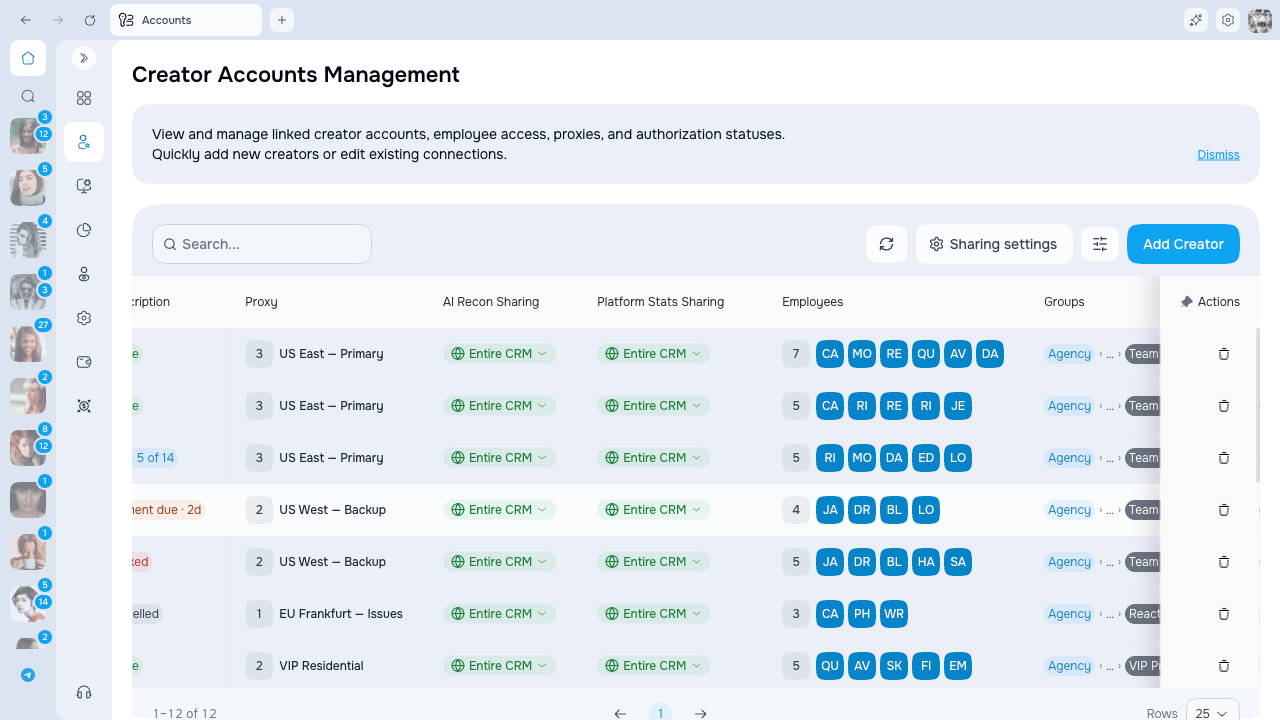
On the **Accounts** page, two columns show the current level for each model:
* **AI Recon Sharing** — the level for AI Recon
* **Platform Stats Sharing** — the level for combined statistics
Each column shows a colored chip with the model's current level. A small dot on the chip marks a model that has its own level set, rather than following the agency default.
The toolbar also has a **Sharing settings** button, which opens the agency-wide default.
 Both sharing columns can be hidden or reordered like any other column. Use the **Columns** button in the page header if you don't see them.
## Set the level for one model
1. Find the model's row on the **Accounts** page.
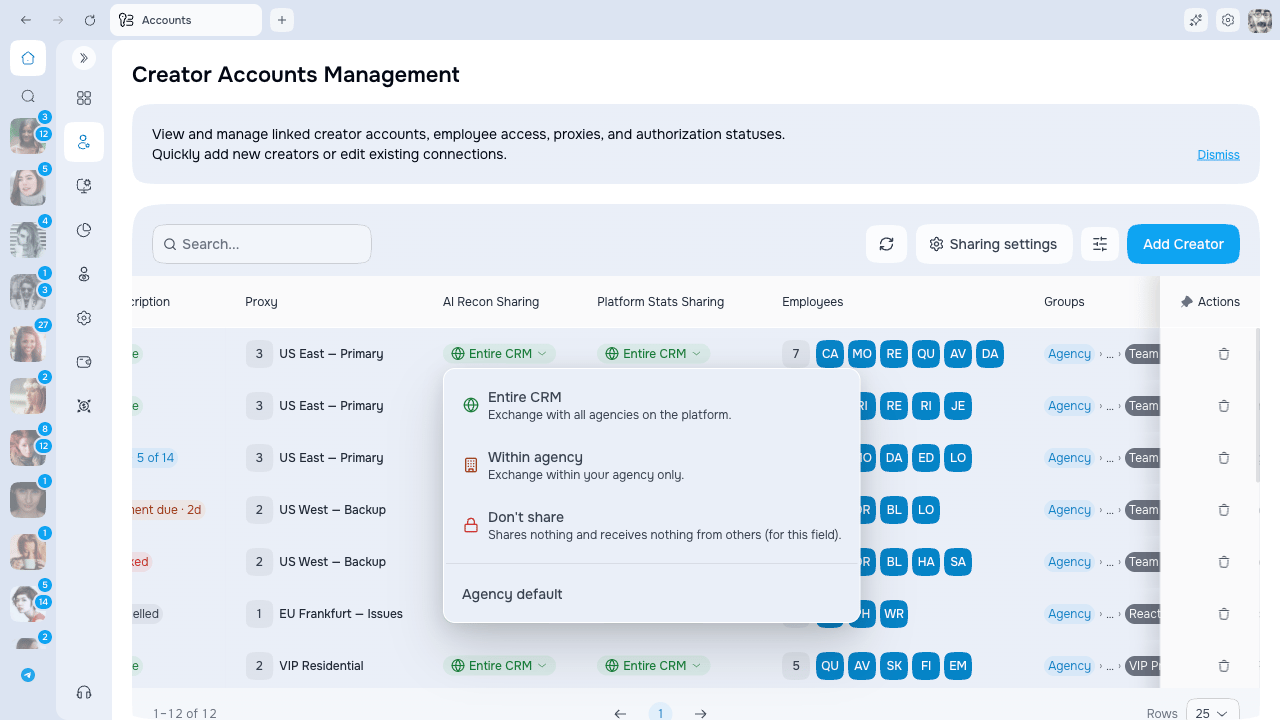
2. Click the chip in the **AI Recon Sharing** or **Platform Stats Sharing** column.
3. Pick a new level from the list.
4. Confirm the change.
To remove a model's own level and have it follow the agency default again, pick **Reset to agency default** from the same list.
Both sharing columns can be hidden or reordered like any other column. Use the **Columns** button in the page header if you don't see them.
## Set the level for one model
1. Find the model's row on the **Accounts** page.
2. Click the chip in the **AI Recon Sharing** or **Platform Stats Sharing** column.
3. Pick a new level from the list.
4. Confirm the change.
To remove a model's own level and have it follow the agency default again, pick **Reset to agency default** from the same list.
 A new level applies right away. Existing AI Recon reports aren't lost — they pick up the new level the next time they're generated.
## Apply to many models at once
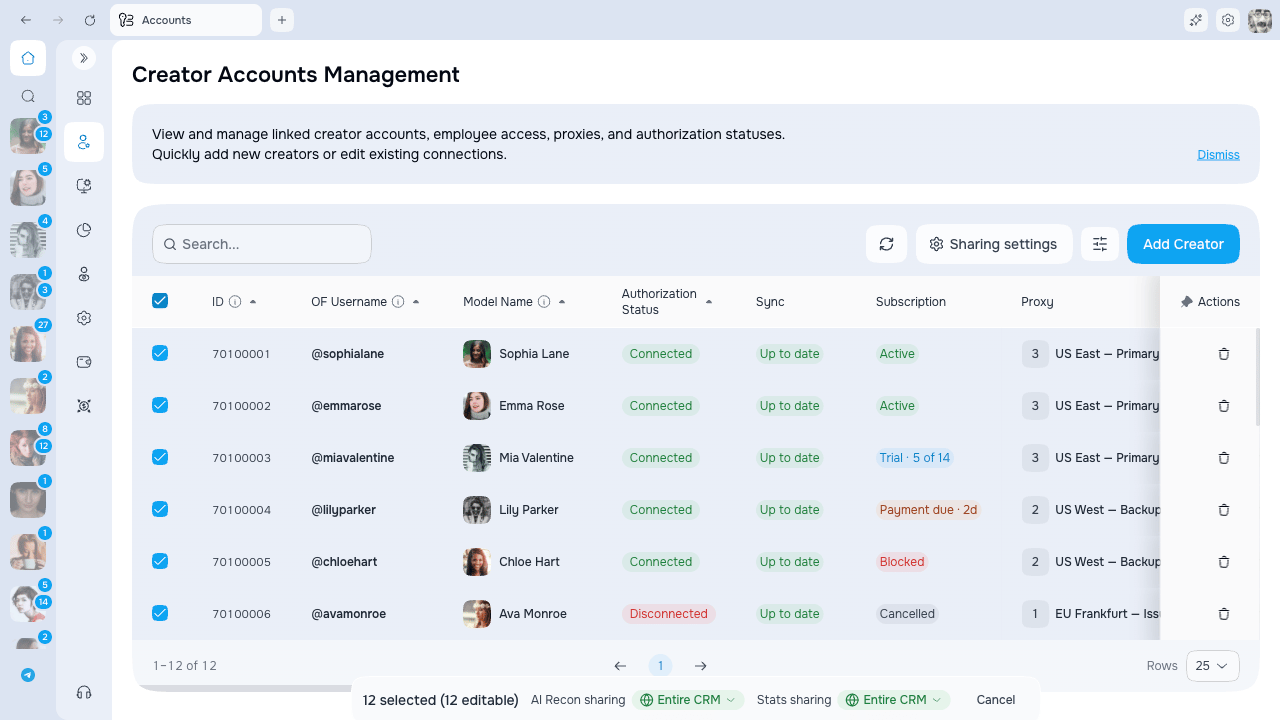
1. Select the rows you want with the checkboxes on the left.
2. A bar appears at the bottom with **AI Recon sharing** and **Stats sharing** dropdowns.
3. Pick a level and confirm to apply it to every selected model in one step.
A new level applies right away. Existing AI Recon reports aren't lost — they pick up the new level the next time they're generated.
## Apply to many models at once
1. Select the rows you want with the checkboxes on the left.
2. A bar appears at the bottom with **AI Recon sharing** and **Stats sharing** dropdowns.
3. Pick a level and confirm to apply it to every selected model in one step.
 You can update up to 500 models at a time. If you select more, you'll be asked to narrow the selection.
## Set the default for the whole agency
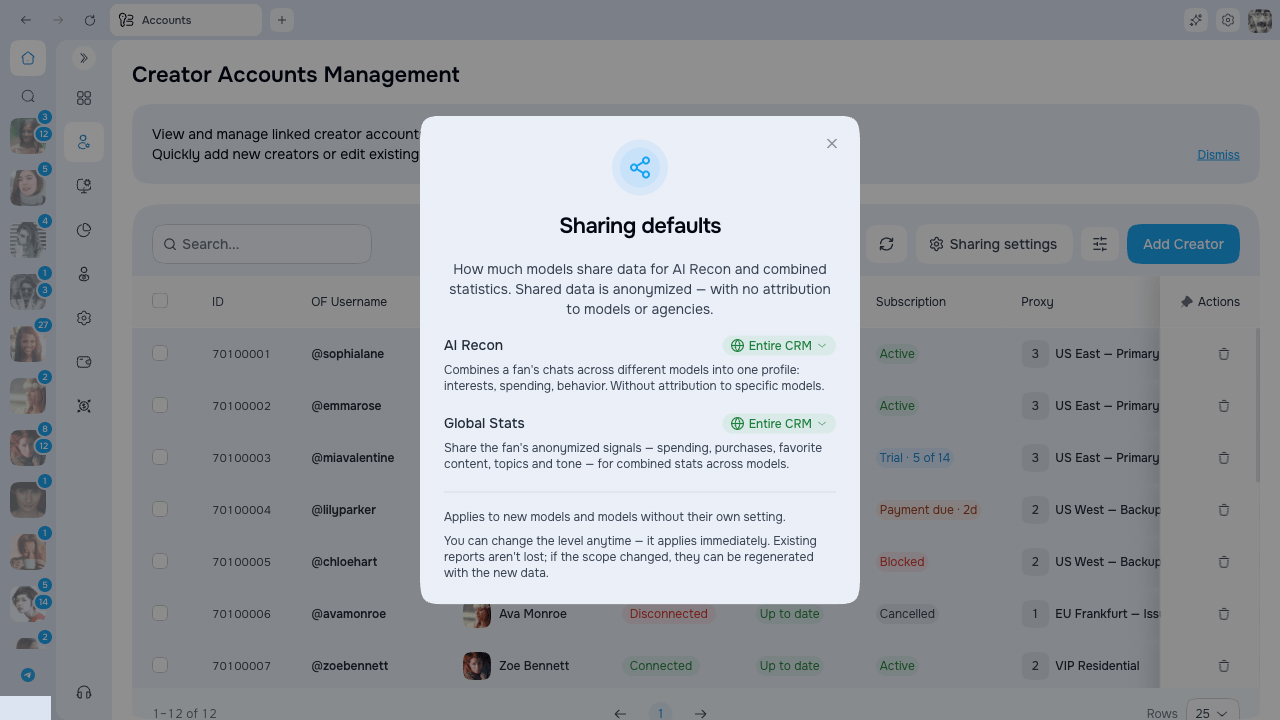
1. Click **Sharing settings** in the toolbar to open **Sharing defaults**.
2. Set a level for **AI Recon** and **Platform Stats**. The initial value for both is **Entire CRM**.
3. Choose whether to apply the default to existing creators that do not have their own override.
You can update up to 500 models at a time. If you select more, you'll be asked to narrow the selection.
## Set the default for the whole agency
1. Click **Sharing settings** in the toolbar to open **Sharing defaults**.
2. Set a level for **AI Recon** and **Platform Stats**. The initial value for both is **Entire CRM**.
3. Choose whether to apply the default to existing creators that do not have their own override.
 The agency default only changes models that don't have their own level. Models with their own level set keep it.
## How the level shows up in chats
The level you set here drives what chatters see inside OnlyFans chats:
| Field | When set to **Don't share** | At **Within agency** / **Entire CRM** |
| ------------------ | --------------------------------------------------------------------------------------- | -------------------------------------------------------------------------------------------------------------- |
| **AI Recon** | AI Recon is turned off for that model, with a note and a shortcut back to its settings. | AI Recon works. **Within agency** shows your own agency only; **Entire CRM** shows the full platform view. |
| **Platform Stats** | The fan statistics panel is hidden behind a banner. | The panel shows numbers — your own agency only at **Within agency**, the full platform view at **Entire CRM**. |
See [AI Recon](/docs/of-manager-chats/ai-recon) for how the briefing reads inside a chat.
## Permissions
| Action | Who can do it |
| ----------------------------- | ------------------------------------------------------------ |
| View the current level | Anyone who can use AI Recon and fan statistics |
| Change the level on a creator | Roles with the account-level sharing action for that creator |
| Set the agency-wide default | Roles with agency-wide sharing management |
Your admin configures these in the Roles section.
## Common issues
### "I don't see the sharing columns"
They may be hidden. Click the **Columns** button in the page header and turn on **AI Recon Sharing** and **Platform Stats Sharing**.
### "I can see the level but can't change it"
You can view the current level but your role does not allow this change. Contact an administrator to review the relevant account and sharing permissions.
### "I don't see the Sharing settings button"
The agency-wide default is only available to roles that manage the whole agency. You can still set the level on individual models if you have permission for them.
### "AI Recon is disabled for a model"
That model's **AI Recon Sharing** is set to **Don't share**. Open its sharing level on the **Accounts** page and pick **Within agency** or **Entire CRM** to turn AI Recon back on.
The agency default only changes models that don't have their own level. Models with their own level set keep it.
## How the level shows up in chats
The level you set here drives what chatters see inside OnlyFans chats:
| Field | When set to **Don't share** | At **Within agency** / **Entire CRM** |
| ------------------ | --------------------------------------------------------------------------------------- | -------------------------------------------------------------------------------------------------------------- |
| **AI Recon** | AI Recon is turned off for that model, with a note and a shortcut back to its settings. | AI Recon works. **Within agency** shows your own agency only; **Entire CRM** shows the full platform view. |
| **Platform Stats** | The fan statistics panel is hidden behind a banner. | The panel shows numbers — your own agency only at **Within agency**, the full platform view at **Entire CRM**. |
See [AI Recon](/docs/of-manager-chats/ai-recon) for how the briefing reads inside a chat.
## Permissions
| Action | Who can do it |
| ----------------------------- | ------------------------------------------------------------ |
| View the current level | Anyone who can use AI Recon and fan statistics |
| Change the level on a creator | Roles with the account-level sharing action for that creator |
| Set the agency-wide default | Roles with agency-wide sharing management |
Your admin configures these in the Roles section.
## Common issues
### "I don't see the sharing columns"
They may be hidden. Click the **Columns** button in the page header and turn on **AI Recon Sharing** and **Platform Stats Sharing**.
### "I can see the level but can't change it"
You can view the current level but your role does not allow this change. Contact an administrator to review the relevant account and sharing permissions.
### "I don't see the Sharing settings button"
The agency-wide default is only available to roles that manage the whole agency. You can still set the level on individual models if you have permission for them.
### "AI Recon is disabled for a model"
That model's **AI Recon Sharing** is set to **Don't share**. Open its sharing level on the **Accounts** page and pick **Within agency** or **Entire CRM** to turn AI Recon back on.